SEO for Apps: A Beginner's Guide (It's Actually Called ASO)
By Sam H
You searched “SEO for apps” and got a wall of web SEO advice. Blog posts about Google rankings. Backlink strategies. Meta descriptions. None of it applies to your iOS app sitting in App Store Connect with twelve downloads.
That is not your fault. Almost nobody outside mobile growth circles uses the right term on day one. The real name for what you want is ASO: App Store Optimization. Same broad idea as SEO (get found in search, turn visits into installs), completely different mechanics.
This guide gives you the vocabulary, the mental model, and a practical path forward. No jargon pile. No pretending you should have known this already.
SEO vs ASO: what’s actually different
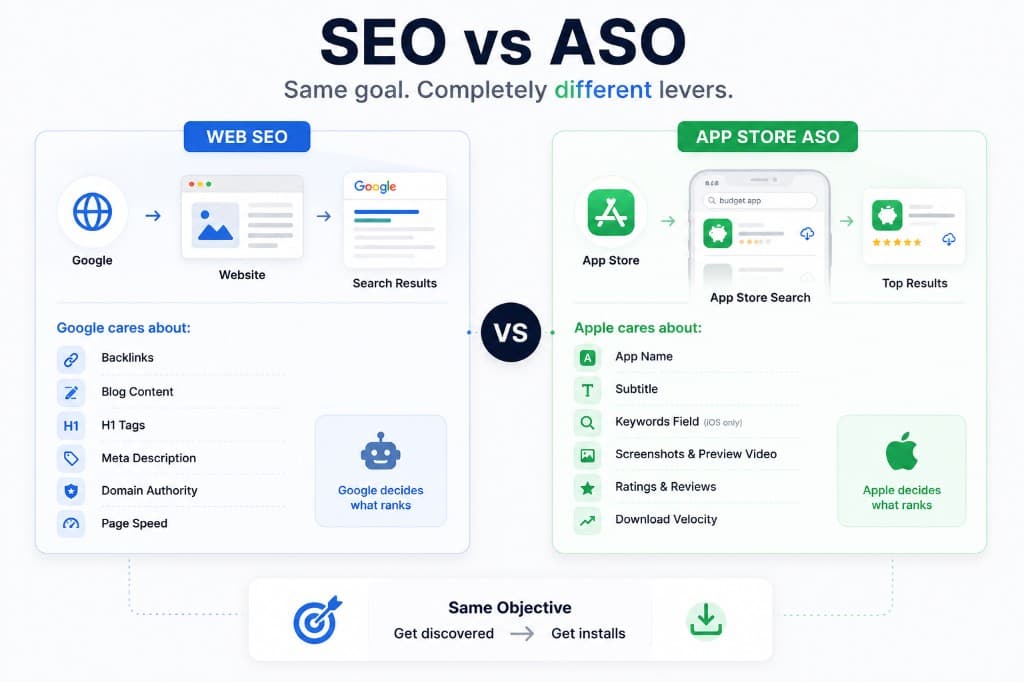
Web SEO ranks pages on Google. ASO ranks apps inside the App Store search box. Users type a query, Apple returns a list, your app either shows up or it does not.
The goal feels familiar: be visible for the searches that matter. The levers are not.
Web SEO cares about backlinks, domain authority, page speed, H1 tags, and content depth. The App Store does not work that way. Apple is not crawling your website and counting who linked to you.
What Apple does look at, in rough order of what you control on day one:
- App name and subtitle — your strongest keyword real estate on iOS
- Keywords field (iOS only, 100 characters, comma-separated, no spaces) — hidden from users, indexed by Apple
- Long description (Android / Google Play) — indexed on Google Play; on iOS the description is mostly for humans, not the search algorithm
- Screenshots and preview video — not “keywords” exactly, but they drive tap-through and installs, which feeds ranking
- Ratings and reviews — social proof that affects conversion once someone finds you
- Download velocity — how fast installs are coming in relative to competitors for a given search term
Notice what is missing. No backlinks. No blog content strategy for the App Store itself. No XML sitemaps.
If you are optimizing your app’s website for Google, that is still SEO. Useful for brand searches and content marketing. But it will not rank your app inside the App Store. Those are two separate games.
Most beginners conflate them because both involve “keywords.” In web SEO you pick phrases and write content around them. In ASO you pick phrases and embed them in fixed metadata fields with strict character limits. The App Store does not reward a blog post about your app category. It rewards an app that converts for that search.
The chicken-and-egg problem every new app hits
Here is the part that frustrates every solo dev who reads an ASO checklist and implements it perfectly.
App Store search rewards download velocity. Apple wants to show apps that people are actively choosing right now for a given query. A brand-new app with zero downloads sends a weak signal. Weak signal means low rank. Low rank means fewer impressions. Fewer impressions means fewer downloads.
You hit the wall fast. Your metadata is clean. Your screenshots look fine. You are still on page four for your category term, invisible.
Organic ASO alone is a slow burn. It works eventually for apps that already have momentum. It is a brutal starting strategy for an app with no audience, no press, and no existing user base to spike installs.
This is not a reason to skip ASO. Metadata still matters. Bad metadata makes everything else harder. A vague app name wastes your best keyword slot. An empty keywords field leaves ranking on the table. But metadata alone rarely breaks the cold-start loop.
You need a way to seed installs while you figure out which search terms actually convert. That is where paid App Store search enters the picture.
Apple Search Ads is the shortcut
Apple Search Ads (ASA)is paid placement at the top of App Store search results. Someone searches “habit tracker” or “budget app,” your app can appear above the organic listings with a small “Ad” label.
You are not buying Google clicks. You are buying App Store search visibility directly.
Why this matters for ASO: every paid install from a search ad sends a velocity signal tied to that keyword. Spend on the right terms, get installs, improve your organic rank for those terms over time. ASA is not a replacement for ASO. For most indie apps, it is how you bootstrap ASO while you still have no organic traction.
Realistic starting budgets for a solo dev testing the waters:
- $10–20/day to learn without burning cash fast
- $300–600/month if you are serious about finding winning keywords in one storefront (usually the US first)
- Scale only after you know which terms produce paying users, not just cheap installs
Which keywords to bid on first:
- Your own app name. Cheap, high intent, defends against competitors bidding on your brand. If someone searches your exact name, you should own that slot.
- Core category terms.The five to ten phrases that describe what your app actually does. “meditation app,” “invoice maker,” “workout planner.” Expect higher cost per tap here. That is normal.
- Long-tail variants once you have data. “meditation app for anxiety” before you go hard on “meditation.” Lower volume, often cheaper, easier to learn on.
Do not start by bidding on every keyword Apple suggests. Start narrow. One country. One campaign. Twenty to thirty keywords you would genuinely want to rank for organically.
I burned my first ASA budget bidding broad category terms with no revenue tracking attached. Installs looked great. MRR did not move. The fix was not spending more. It was spending on fewer keywords and watching what happened after the install.
For the full connection flow (API credentials, app setup, RevenueCat link), see the ASA setup guide for indie devs.
What to actually measure once you’re spending
Here is where most solo devs waste their first few hundred dollars.
The native Apple Search Ads dashboard shows spend, taps, installs, and cost per install. It stops there. It does not show subscription revenue. It does not show trial-to-paid rate. It does not tell you that “budget app” drove forty installs and zero subscriptions while “expense tracker” drove six installs and four paid users.
Installs are not the outcome. Revenue is.
If you use RevenueCat for subscriptions, you already have the revenue side. The gap is joining it to keyword-level spend. Without that join, you optimize for cheap installs and wonder why ROAS looks fine in Apple’s dashboard while your MRR barely moves.
What to watch once campaigns are running:
- Revenue per keyword, not just cost per install
- Trial starts and paid conversions tied back to the search term that brought the user
- ROAS by keyword after at least a few weeks of data (subscriptions need time to convert and renew)
The native ASA dashboard will not give you keyword-level revenue. You either build spreadsheets, export CSVs and match manually, or use a tool built for the gap. AppSkale connects Apple Search Ads spend to RevenueCat revenue so you can see which keywords actually pay for themselves. That is the measurement loop most solo devs get stuck without.
If you want the ROAS math spelled out separately, see how to calculate Apple Search Ads ROAS with RevenueCat.
Where to go next
You now have the vocabulary. ASO is App Store SEO. Metadata gets you indexed. Download velocity gets you ranked. Apple Search Ads seeds the velocity while you learn what converts.
A sane first-week checklist:
- Fix your app name, subtitle, and keywords field for your primary storefront
- Set up Apple Search Ads on your app name plus ten to fifteen category terms
- Connect revenue tracking before you scale spend (RevenueCat plus keyword-level reporting)
- Review weekly: pause keywords that spend without revenue, keep the ones that do
Start the ASA setup here: ASA setup guide for indie devs. When you are ready to see revenue per keyword instead of guessing from install counts, AppSkale is built for exactly that problem.