Apple Search Ads for Beginners: Should You Actually Run Them?
By Sam H
You heard about Apple Search Ads. Maybe from a podcast, a Twitter thread, or another indie dev who swears it is the fastest way to get installs. The pitch sounds simple: bid on keywords, show up at the top of App Store search, watch downloads roll in.
Before you spend a dollar, decide whether it is actually the right move for your app right now. ASA can work well. It can also burn through a few hundred dollars in a week while your MRR stays flat because you were not ready to run it yet.
Apple Search Ads is not a magic install machine. It is a paid learning loop. You spend to find out which search terms bring users who actually stick around and pay. That is worth doing. It is also worth delaying if your app is not ready to absorb the traffic.
This post tells you when to skip Apple Search Ads, not just when to run it. If you are still fuzzy on App Store search basics, start with SEO for apps (it is actually called ASO). If you already know you want to run ASA, keep reading.
What Apple Search Ads actually is (in one paragraph)
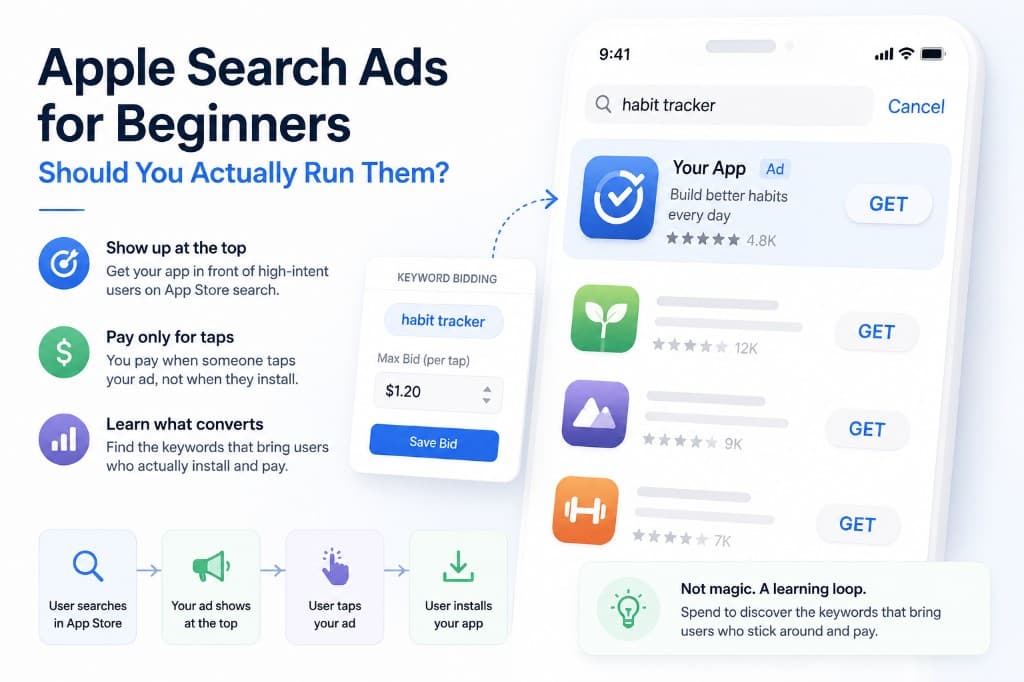
Apple Search Ads is paid placement at the top of App Store search results. You pick keywords, set a max bid per tap, and your app appears above the organic listings when someone searches that term. You pay when someone taps your ad, not when they install. It is not the same as Google Ads or Facebook Ads. The user is already inside the App Store search box, already hunting for an app. That intent is much closer to a download decision than a social feed scroll or a blog visit.
Who should actually run Apple Search Ads
ASA is not a universal growth button. It works best when your app is already doing something right on its own, and paid search amplifies a signal you can measure. Three signs your app is ready:
- You monetize. Subscription, in-app purchase, or paid app. Free apps with no revenue path can run ASA, but the playbook is different and the learning loop is harder. If you cannot point to where money comes from after an install, you will optimize blind.
- Your app converts installs into activation or paid at a reasonable rate. You do not need perfect numbers. You should already know from organic downloads whether people open the app, start a trial, or buy something. If organic users bounce immediately, paid users will too.
- You have retention data or solid ratings. Roughly thirty days of retention numbers, or ratings above about 4.0. Buying installs into a leaky bucket burns cash fast. Bad reviews kill your tap-to-install rate before you ever get a chance to learn on keywords.
If all three are true, ASA is worth testing. You are not guaranteed profit on day one. You are ready to learn without fooling yourself.
Who should wait
Blunt version: some apps should not run Apple Search Ads yet. Fix the foundation first.
- Zero paying users so far. Fix conversion before you buy traffic. Paid installs into a broken funnel just accelerate the loss.
- No RevenueCat or equivalent revenue tracking. If you cannot tie an install back to a subscription or purchase, you cannot know whether ASA is working.
- App is under 3.5 stars. Low ratings crush tap-to-install. You pay for taps that never convert because the listing looks risky.
- You are not ready to spend a few hundred dollars over four to six weeks. ASA needs runway to produce signal. Below that, you are mostly guessing.
- You have not done the free ASO work yet. App name, subtitle, keywords field, screenshots. Defend your own app name organically before you pay to defend it.
Waiting is not failure. I ran ASA too early on an app with weak onboarding and no revenue tracking. Installs went up. Nothing else moved. The problem was not Apple Search Ads. The problem was me buying traffic before the app could hold it.
What it actually costs
These are observed ranges for indie subscription apps, not guarantees. Your category and keywords will differ.
- Cost per tap: roughly $0.30–$2.00 in most subscription app categories, depending on keyword competitiveness
- Cost per install: often $2–$8 for indie categories, higher for finance, dating, and health
- Minimum viable learning budget: about $300–$600 over four to six weeks in one storefront, usually the US first
- Below $10/day you get so little data that you cannot make decisions with confidence
Do not scale spend until you know which keywords produce paying users, not just cheap installs. A keyword that costs $6 per install but converts trials well can beat a keyword at $1.50 that never pays. CPI alone will lie to you.
Apple Search Ads vs ASO is not either/or. ASO is the free, slow path: metadata, ratings, organic download velocity. ASA is the paid path to seed velocity and learn faster. Most indie apps that grow through App Store search use both, but ASA only makes sense once ASO basics are in place and you can measure what happens after the install.
The three things that go wrong for beginners
These are patterns I see constantly, including in my own early campaigns.
- Bidding on category terms too early. Huge volume, expensive, generic intent, low conversion. “Fitness app” sounds right until you realize everyone tapping it is browsing, not buying. Fix: start with your own app name and five to ten tight long-tail terms that describe a specific use case.
- Optimizing for cost per install instead of revenue. Installs look great in the ASA dashboard while MRR does not move. Fix: track revenue per keyword before you scale. If you cannot see it yet, do not raise budgets.
- Turning it all on at once. One giant campaign, dozens of keywords, Discovery mode enabled, multiple countries. You spend money everywhere and learn nothing. Fix: one storefront, one campaign, one match type, small keyword list, review weekly.
My first broad campaign felt productive because the install line went up. I had no idea which keywords were funding the account and which were draining it. Narrowing the keyword list and attaching revenue data changed more than any bid tweak I tried.
The one metric that decides if ASA is working for you
Return on ad spend by keyword, measured over a window long enough to capture your typical subscription conversion and first renewal. For most subscription apps that is thirty to sixty days minimum, sometimes ninety.
Cost per install is a vanity metric. It tells you how cheaply you bought attention. It does not tell you whether those users paid. Revenue per keyword is the only number that answers “should I keep running this?”
The native Apple Search Ads dashboard shows spend, taps, and installs. It does not show subscription revenue by keyword. RevenueCat has the revenue side. Apple has the spend side. Without joining them, you are guessing which keywords fund your account.
That is the gap AppSkale is built for: ASA spend tied to RevenueCat revenue at the keyword level, so you can see ROAS per term instead of blending winners and losers into one average.
A first-week plan if you decide to run it
- Set up ASA attribution. Follow the Apple Search Ads attribution setup guide before you turn on spend.
- Start with a brand defense campaign on your own app name. Cheap, high intent, protects against competitors bidding on your brand.
- Add one category campaign with ten to fifteen long-tail keywords you would actually want to rank for organically.
- Set a daily spend cap you are comfortable losing while you learn. Treat the first month as tuition, not scaling budget.
- Connect revenue tracking before you scale. RevenueCat plus keyword-level reporting, not campaign totals alone.
- Review weekly, not daily. You need enough data to make decisions. Daily panic adjustments waste money.
Where to go next
Apple Search Ads is worth it when your app converts, you can measure revenue, and you have budget to learn over a few weeks. It is not worth it when you are buying installs into a broken funnel and calling the install count progress.
For technical setup, use the Apple Search Ads attribution setup guide. For the ROAS math once revenue is connected, read how to calculate Apple Search Ads ROAS with RevenueCat. If you still need the ASO foundation first, go back to SEO for apps: a beginner’s guide.
When you are ready to see which keywords actually pay for themselves, AppSkale connects Apple Search Ads spend to RevenueCat revenue so you are not optimizing on install counts alone.