Brand Keywords vs Category Keywords: Where Your First $500 Should Go
By Sam H
You have about $500 for your first Apple Search Ads test. Everyone tells you to bid on keywords. Nobody tells you which keywords first, or how much to put on each. So you open the campaign builder, add “meditation app” and “habit tracker” and “notes app,” set a daily budget, and hope the dashboard makes sense in a week.
It usually does not. Head category terms eat the budget fast. Installs look fine. Revenue does not move. You are left wondering if ASA is broken when the problem is allocation, not the channel.
There are two keyword types that matter at the start: brand and category. Brand is your app name. Category is everything else. The order you spend on them, and which category terms you pick, matters more than your total budget.
Start with brand keywords
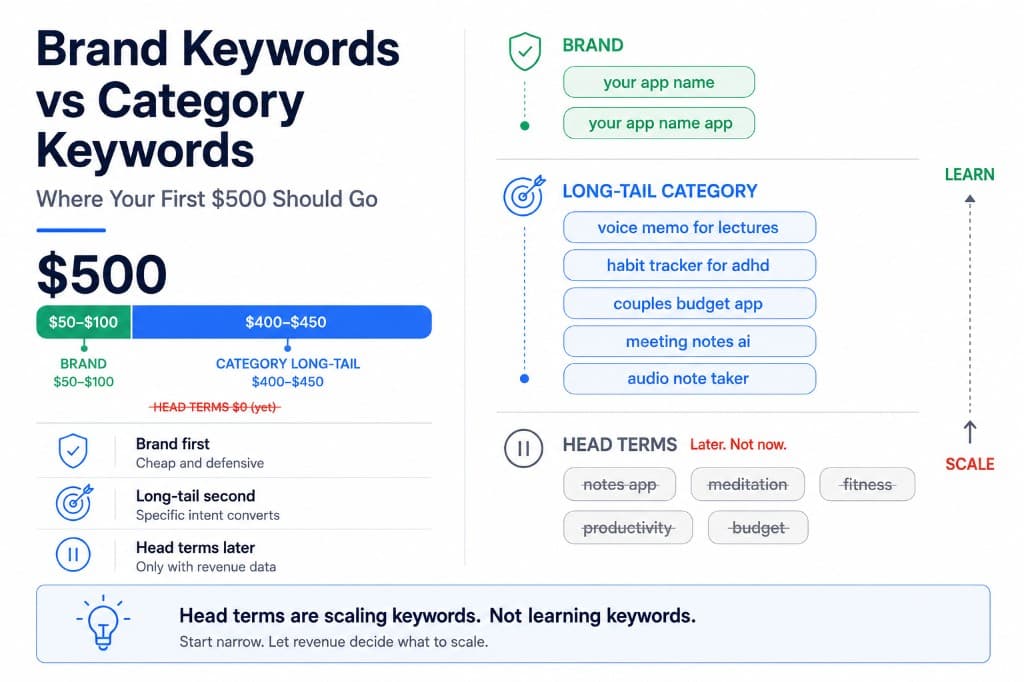
Brand keywords are searches for your app by name. “your app name,” “your app name app,” close misspellings. Someone already knows your product and typed it into the App Store search box.
Bid on your brand first for three reasons:
- Cheap. Nobody else is usually bidding on your exact name unless you are big enough to attract competitors. Cost per tap is often the lowest in your account.
- High intent. They searched for you specifically. Tap to install is higher than generic category terms.
- Defensive. Competitors can bid on your brand name. If you are not there, their app shows at the top when someone searches for you.
A brand defense campaign is the lowest-risk place to learn how ASA works. Spend stays small. Signal is clean. You are not guessing intent.
If you have not done the free ASO work on your app name and subtitle yet, do that before you pay to defend the brand. See SEO for apps (ASO basics) if you need the foundation.
Then add category keywords, but not head terms
Category keywords describe what your app does without naming it. “Voice memo app,” “budget planner,” “habit tracker for ADHD.” This is where discovery happens. It is also where beginners burn money.
Head category terms are the short, obvious ones: “notes app,” “meditation,” “fitness.” High search volume. High competition. Expensive cost per tap. Generic intent. Someone searching “notes app” is browsing, not buying your specific solution.
I spent my first ASA budget on head terms because the volume looked exciting. Installs came in. Almost none converted to trials. The keywords were not wrong for the category. They were wrong for my app at that stage.
Long-tail category terms are the middle ground. Lower volume, lower cost, tighter intent. “Voice memo for lectures” instead of “recorder app.” “Couples budget app” instead of “finance.” You learn faster because each term maps to a specific user problem your app solves. Narrow terms can feed broader ranking over time, but only if you pick terms that actually convert.
Why head terms are a trap before you have revenue data
Head category keywords fail beginners for a predictable reason: you cannot tell yet whether the traffic pays.
- Volume hides bad economics. Enough installs roll in that the campaign looks alive even when ROAS is terrible.
- Competition pushes bids up. You pay premium rates to sit above apps with more ratings, better screenshots, and years of download velocity.
- Generic intent dilutes conversion. The user who wanted a free game and the user who wanted your subscription tool both search broad terms. You pay for both taps.
Head terms become viable later, once you know your LTV by keyword and can afford to bid against established competitors. Not in the first $500.
Think of head terms as scaling keywords, not learning keywords. You scale them when one long-tail variant already proves the intent converts. You do not start there hoping volume will teach you something revenue data cannot.
Keep Search Match off while you learn. It expands into head-like broad matching automatically. See Search Match is eating your budget if that setting is still on.
How to split your first $500
A practical allocation for a solo dev testing in one storefront, usually the US:
- Brand campaign, Exact match, ~$50–$100 total. Your app name and two or three close variants. Run until you own the top slot consistently.
- Category campaign, Exact match, ~$400–$450. Ten to fifteen long-tail terms you would genuinely want to rank for organically. Not the shortest version of each idea. The specific one.
- Daily cap you can lose. $10–15/day across both campaigns. Four to six weeks of runway.
One storefront. One match type per ad group. No Discovery campaigns yet. No head terms until the long-tail list shows you which intent converts.
Example split for a note-taking app: brand on “your app name” and “your app name app.” Category on “voice memo for lectures,” “meeting notes app,” “audio note taker,” not on “notes app” or “productivity.” The specific phrases cost less and tell you more.
If you are not sure ASA is right for your app yet, read Apple Search Ads for beginners before you spend.
What to measure after two weeks
Do not judge this test on install count alone.
- Brand campaign: cost per install should be low. If brand is expensive, something is wrong with your listing or a competitor is bidding aggressively on your name.
- Category long-tail: look for terms with trials or purchases, not just taps. One keyword with three paid conversions beats ten keywords with thirty installs and zero revenue.
- Head terms you accidentally triggered: pause anything broad that Search Match or Broad match surfaced. Add winners as Exact keywords manually.
The native ASA dashboard shows spend and installs per keyword. It does not show subscription revenue. Connect RevenueCat before you decide which category terms to scale. AppSkale puts revenue per keyword next to spend so you can see which terms fund the account and which only burn the first $500.
Where to go next
Brand first. Long-tail category second. Head terms later, only with revenue data. That is the order that turns $500 into learning instead of noise.
After four to six weeks, pause keywords that spend without revenue and put more budget on the terms that produce trials or purchases. For the ROAS math behind the revenue check, see how to calculate Apple Search Ads ROAS with RevenueCat. For setup, use the Apple Search Ads attribution setup guide.
When you are ready to see which keywords actually pay for themselves, AppSkale shows brand and category spend alongside subscription revenue on one screen.