Your Trial Started. Your ROAS Didn't Move. Now What?
By Sam H
You set up Apple Search Ads. Connected RevenueCat. Ran the campaign for two weeks. Installs are coming in. Trials are starting. You open your ROAS dashboard and it reads zero, or close enough that it might as well be zero.
The instinct is to panic. Pause everything. Declare ASA a failure. Or double down because installs look healthy and surely revenue will catch up. Both reactions are usually wrong for the same reason: subscription ROAS has a built-in lag that the Apple Search Ads dashboard does not explain.
This post is for that gap. Not whether to run ASA, but what to do when early data looks fine on installs and trials while revenue has not arrived yet.
Why ROAS looks flat even when trials are starting
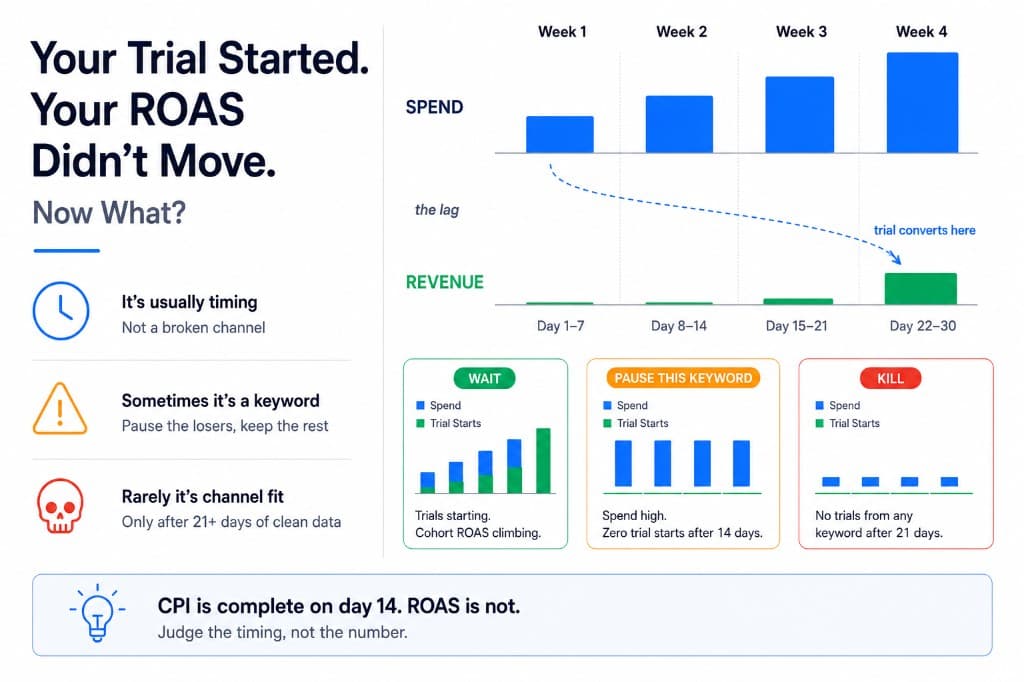
Apple Search Ads charges you when someone taps your ad. That spend shows up immediately. Subscription revenue from those users does not.
A typical free-trial flow looks like this: install today, start trial within a day or two, convert to paid at the end of the trial window. If your trial is seven days, the first dollar from that cohort might not land until day eight. If it is fourteen or thirty days, the wait is longer. ROAS is spend divided by revenue. Spend is front-loaded. Revenue is back-loaded. The ratio looks terrible until enough trials have had time to convert.
That is not a tracking bug. It is how trial-based subscription apps work. The ASA dashboard will happily show you cost per install while RevenueCat quietly waits for billing events that have not fired yet.
If attribution is not wired up yet, fix that before you draw any conclusions. Follow the Apple Search Ads attribution setup guide first. Without keyword-level revenue data, you are guessing whether the lag is normal or the campaign is actually broken.
Installs and trials are not revenue
The Apple Search Ads dashboard optimizes for what Apple can see: taps, installs, sometimes in-app events if you configure them. None of that is MRR.
- Cost per install tells you how cheaply you bought a download. It says nothing about whether that user starts a trial, completes onboarding, or ever pays.
- Trial starts are a step forward. They mean someone got far enough into your funnel to commit to trying the product. They are still not revenue until the trial converts or the user purchases.
- ROAS only becomes meaningful once enough of your trial cohort has passed the conversion window. For most subscription apps, that is at least thirty days, often sixty or ninety if you care about renewals.
I have killed campaigns that looked dead on ROAS at day ten. Trials were still running. Conversions showed up two weeks later on keywords I had already paused. The installs were not the problem. My patience window was shorter than my trial length.
For the full picture on connecting spend to revenue events, see how to track Apple Search Ads conversions. ROAS math once revenue is flowing is in how to calculate Apple Search Ads ROAS with RevenueCat.
The timeline: what to expect week by week
Exact numbers vary by app, trial length, and category. This is a reasonable mental model for a seven-to-fourteen-day trial:
- Days 1–3: Spend accumulates. Installs appear. ROAS is zero or near zero. This is normal. Do not optimize yet.
- Days 4–7: Trial starts should show up in RevenueCat if onboarding works. You can compare trial rate by keyword even though revenue is still flat. Keywords with installs but zero trials are a product or listing problem, not a lag problem.
- Days 8–14: First conversions from early cohorts begin landing. ROAS is still incomplete because most trials have not ended. Trend matters more than the absolute number.
- Days 15–30: Enough cohorts have converted that keyword-level ROAS becomes actionable. This is when pause, keep, and scale decisions belong on the table.
If your trial is thirty days, push every phase forward by two to three weeks. Judging day-seven ROAS on a thirty-day trial is like grading a test before anyone has handed it in.
Early signals worth watching before ROAS arrives
You cannot read full ROAS during the lag. You can read leading indicators that tell you whether to wait or cut.
- Trial start rate by keyword. Same spend, one keyword produces trials and another produces only installs. That is a signal before revenue. Pause the install-only terms if the sample is big enough to trust.
- Brand vs category split. Brand keywords should convert faster and cheaper. If brand is expensive with no trials, check your listing or competitor bids before blaming the channel.
- Spend with zero engagement. A keyword that burns budget with installs but no trial starts after a meaningful sample is not a lag problem. It is a mismatch between search intent and your app.
- Search Match leakage. Broad matching can inflate installs on irrelevant terms. If trials are thin across the board, check whether Search Match is on. See Search Match is eating your budget if you have not audited that setting.
These are interim metrics. They help you stop obvious waste without killing keywords that need time to prove revenue.
When to wait vs when to pause
Wait when trials are starting at a reasonable rate, spend is controlled, and you are still inside the conversion window. The campaign is doing its job. Revenue just has not caught up yet.
Pause or reduce when:
- A keyword has meaningful spend and installs but zero trial starts after two weeks
- Trial starts exist but organic baseline trial rate is much higher, suggesting paid traffic is lower quality than free traffic
- You are past one full trial cycle plus a buffer and ROAS is still clearly negative with no improving trend
- Daily spend is outpacing what you can afford to lose while waiting for conversions
Waiting is not infinite patience. It is waiting long enough for your trial length to produce a real answer. Pausing is not failure. It is stopping spend on terms that already showed they will not convert, while giving promising terms time to finish the cycle.
Mistakes that make the lag worse
- Checking ROAS daily. Daily swings mean nothing during a trial lag. Weekly reviews are enough until you have thirty days of cohort data.
- Scaling on cost per install. Cheap installs that never trial are not a win. CPI is a vanity metric for subscription apps. Revenue per keyword is the decision metric.
- Pausing every keyword at day ten. You reset the learning loop and never find out which terms actually pay.
- Never pausing anything. Hope is not a strategy. Keywords with spend and no trial starts after two weeks are telling you something now, not later.
- Blending all keywords into one ROAS number. One profitable term and three losers average into mediocrity. Evaluate at the keyword level, not the campaign total.
If you are still in the first $500 learning phase, make sure budget is split correctly before you diagnose a lag problem. See brand vs category keywords: where your first $500 should go for the allocation order.
A practical review cadence during the lag
- Week 1: Confirm attribution works. Check that spend maps to installs and trial events in RevenueCat. Fix tracking before optimizing bids.
- Week 2: Compare trial start rate by keyword. Pause obvious mismatches. Leave everything else running.
- Week 3–4: First revenue events should appear. Note which keywords produced paying users, not just which had the lowest CPI.
- After one full trial cycle: Calculate ROAS by keyword. Scale winners. Pause losers. Do not raise budgets on terms that only looked good on installs.
The native ASA dashboard will not show you this at the keyword level with revenue attached. That is the gap AppSkale is built for: spend and subscription revenue on the same screen, so you can wait on the right keywords and cut the wrong ones without guessing.
Where to go next
Flat ROAS during the first two weeks of a trial app is usually a timing problem, not a channel problem. Trials need time to convert. Spend does not wait. Read trial starts and keyword-level engagement while revenue catches up, and only make scale decisions once a full cohort has had time to pay.
If you have not decided whether ASA is right for your app yet, start with Apple Search Ads for beginners. For setup, use the Apple Search Ads attribution setup guide. For ROAS once conversions land, read how to calculate Apple Search Ads ROAS with RevenueCat.
When you are ready to see which keywords produce trials and revenue instead of just installs, AppSkale connects Apple Search Ads spend to RevenueCat so you are not flying blind through the lag.