Apple Search Ads Negative Keywords: The Quiet Budget Saver
By Sam H
Most Apple Search Ads advice is about which keywords to buy. Almost nobody talks about which searches to block. That is a problem, because the quietest budget leak in a beginner account is often not a bad seed keyword. It is a related query you never meant to pay for.
Negative keywords are how you stop that. They tell Apple not to show your ad for specific searches. Used well, they protect Exact learning, clean up Broad discovery, and keep Search Match from taxing the account twice. Used poorly, they block useful traffic before you have enough data.
This post covers what negatives do, which ones beginners should add early, and how to harvest more from the search terms report without overblocking.
What negative keywords actually do
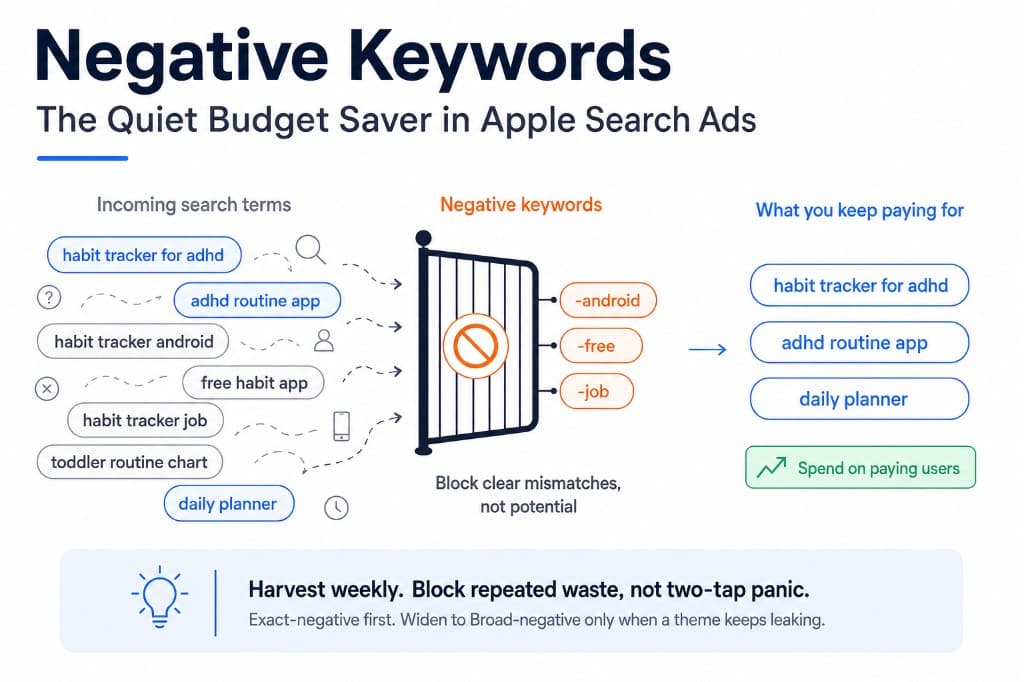
A negative keyword prevents your ad from matching a search. If someone types that term, or a close enough variant depending on negative match type, your campaign stays out of the auction for that query.
That sounds small. It is not. Apple Search Ads can spend on queries that are adjacent to your keyword but wrong for your product: competitor brand names you do not want, free-only intent, wrong platforms, kids versions, job-seeker searches, or category words that look related and convert like mud.
Negatives do not make a bad app profitable. They stop you from paying to learn the same dead-end intent over and over.
Why beginners ignore them
- The UI pushes adding keywords, not blocking them. Setup feels complete once the positive list looks long enough.
- Spend looks like progress. Irrelevant taps still create installs sometimes. The dashboard feels alive while revenue stays flat.
- People fear blocking “potential.” They leave loose traffic running because maybe it converts later. Usually it just repeats the same waste.
- Search Match and Broad hide the leak. If expansion settings are on, junk queries appear without you choosing them. See Search Match is eating your budget and Exact vs Broad match if those controls are still messy.
I used to treat negatives as an advanced cleanup step. That was late. A short block list in week one would have saved more learning budget than another round of bid tweaks.
The first negatives worth adding
Start with obvious mismatches for your app, not a giant scraped list. Common beginner blocks:
- Wrong platform or device intent: android, apk, windows, chrome extension, when you are iOS-only
- Free-only hunters: free, no login, offline free, if your product is clearly paid or subscription-led and those queries never convert
- Jobs and side-hustle noise: job, hiring, salary, work from home, when your app is a consumer tool
- Competitor brands you will not win: only if you have decided not to conquest them yet
- Misaligned audience modifiers: kids, toddler, enterprise, school, depending on who your app is actually for
Do not negative your own brand. Do not negative every competitor by default if conquest is part of the test. And do not block a term after two taps. Negatives are for clear intent mismatches and repeated waste, not panic edits.
Where negatives matter most
- Broad match discovery ad groups. Expansion will surface related junk. Negatives are how you keep discovery useful.
- Search Match campaigns. If Search Match is still on, negatives are damage control. Better to turn Search Match off during learning, then use negatives when you intentionally expand.
- Category campaigns with shared themes. A notes app can attract productivity, AI writer, homework, and meeting transcription searches that look adjacent and convert differently.
- Brand defense, lightly. Usually brand Exact needs fewer negatives. Still block clear typos into unrelated products or support/scrape intent if it shows up.
If your first budget is still being allocated, keep the positive list tight first. Negatives help more when the campaign structure is already sane. See where your first $500 should go.
How to harvest negatives from search terms
The search terms report is the source of truth. Weekly is enough for most indie budgets.
- Sort by spend, then scan for queries with taps or installs and no meaningful trials or revenue.
- Ask one question: is this intent ever going to buy my app? If no, add it as a negative.
- If a Broad term converts, do not negative it. Promote it to Exact in a controlled ad group.
- Group repeats. If five wasted queries share “free” or “android,” negative the root theme instead of playing whack-a-mole forever.
- Keep a simple running list outside Apple so you can reuse blocks across ad groups and storefronts.
This is the same harvest loop as Broad match done properly: keep winners, block losers, stop rediscovering the same waste. Without revenue attached, you will negative too slowly or too aggressively. Join spend to subscriptions with RevenueCat before you scale either side. The ROAS math is in how to calculate Apple Search Ads ROAS with RevenueCat.
Exact vs Broad negatives, briefly
Negative match types matter too.
- Exact negative: blocks that specific search. Use when one query is clearly bad but nearby variants might still be useful.
- Broad negative: blocks a wider set of related searches. Use for clear themes like android or free when those themes are never a fit.
Beginners often overuse Broad negatives and accidentally cut good long-tail traffic. When unsure, Exact-negative the wasted query first. Widen only after the same theme keeps leaking spend.
Mistakes that make negatives backfire
- Blocking after tiny samples. Two taps is not a strategy. Wait for repeated waste or obvious mismatch.
- Negativing your category head terms you still want to test later. If you are not ready for “notes app,” just do not bid it yet. You do not always need a negative for a term you never added.
- Copying someone else’s giant negative list. Their waste is not your waste. Start from your search terms.
- Never reviewing old negatives. Product positioning changes. A block that made sense at launch can become wrong later.
- Using negatives to fix a broken funnel. If trials never start from any keyword, the problem may be onboarding or paywall, not match control. See your trial started, your ROAS didn’t move before you blame query expansion alone.
A simple weekly negative routine
- Monday or Friday, fifteen minutes. Open search terms for the last seven days.
- Block clear mismatches. Wrong platform, wrong audience, free-only hunters that never convert for you.
- Promote Broad winners to Exact. Do not leave converting queries buried in expansion forever.
- Check brand separately. Make sure you did not accidentally block a useful brand variant.
- Confirm revenue, not just installs. A query with cheap installs and zero trials is a stronger negative candidate than a slightly expensive query that starts trials.
The native ASA dashboard will show the wasted search terms. It will not cleanly show which of those terms ever produced subscription revenue. AppSkale puts keyword-level spend next to RevenueCat revenue so you can negative with less guesswork.
Where to go next
Negative keywords are not glamorous. They are one of the highest-leverage controls in a small Apple Search Ads account. Block clear mismatches early, harvest weekly from search terms, promote Broad winners to Exact, and do not confuse a broken funnel with a match-type problem.
If you are still setting foundation controls, read Exact vs Broad match and Search Match is eating your budget. For attribution setup, use the Apple Search Ads attribution setup guide. If you are new to the channel entirely, start with Apple Search Ads for beginners.
When you want to see which search terms fund the account and which only burn budget, AppSkale connects Apple Search Ads spend to RevenueCat revenue so negatives are based on paying users, not vibes.