Exact Match vs Broad Match in Apple Search Ads: What Beginners Should Use
By Sam H
You open Apple Search Ads, add a keyword, and Apple asks for a match type: Exact or Broad. Most beginners pick Broad because it sounds like more traffic. Then the search terms report fills with queries they never meant to buy, spend climbs, and they still cannot tell which keywords actually work.
Match type is not a minor setting. It decides whether you are testing a specific search phrase or letting Apple expand around it. Get it wrong early and you spend your learning budget on noise.
This post explains what Exact and Broad actually do, which one beginners should use first, and when Broad becomes useful later. If Search Match is still on, fix that first. See Search Match is eating your budget. Search Match and Broad match are different controls that create the same kind of mess when you are still learning.
Exact match vs Broad match in plain English
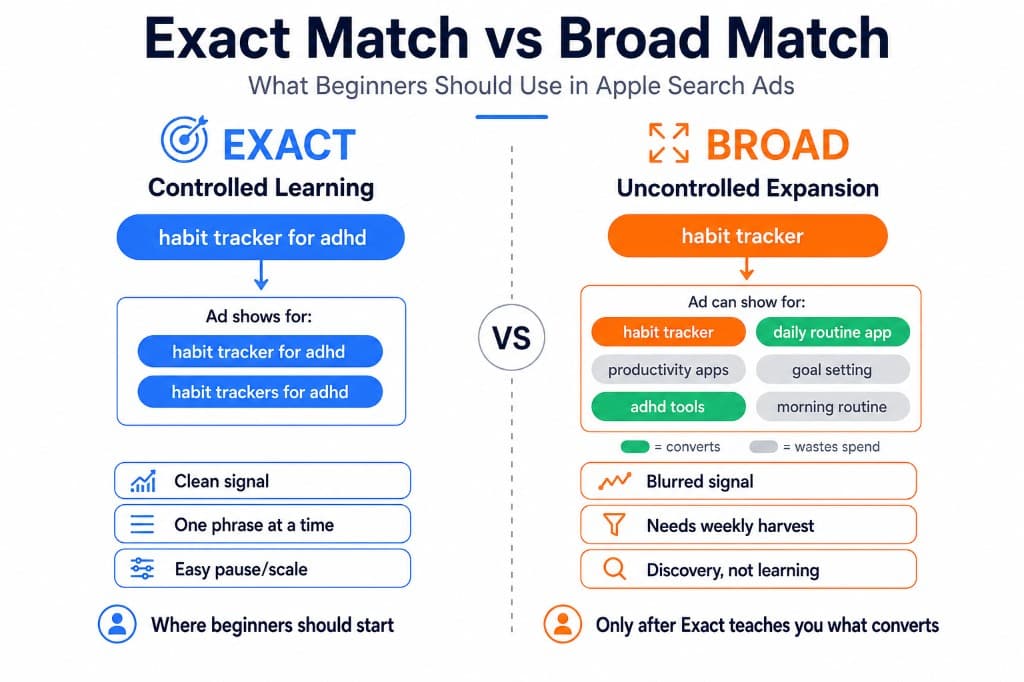
Exact match means your ad can show for that keyword and close variants Apple treats as the same intent: plurals, misspellings, and very similar word order. If you bid Exact on “habit tracker for ADHD,” you are mostly buying that search, not every related habit app query in the store.
Broad match means Apple can show your ad for searches related to your keyword, including synonyms and looser variations. Bid Broad on “habit tracker” and you may appear for terms that share the theme but not the intent you wanted. More reach. Less control.
Neither match type is “wrong.” They solve different jobs. Exact is for controlled learning. Broad is for discovery once you can measure which expanded queries convert into trials and revenue.
Why beginners should start with Exact
Your first Apple Search Ads budget is tuition. The goal is a clean answer: which search terms bring users who pay? Exact match is built for that.
- Cleaner signal. When a keyword spends, you know roughly which query you bought. Broad blurs that into a cloud of related searches.
- Easier decisions. Pause, keep, or scale one phrase at a time. Broad forces you to mine the search terms report before you even know your baseline conversion.
- Less wasted spend. Broad can look productive because volume rises. Volume without revenue is not progress for a subscription app.
- Better fit for small lists. Brand defense plus ten to fifteen long-tail category terms works best as Exact. That is the same allocation logic as where your first $500 should go.
I burned early budget on Broad because it felt like I was “covering the category.” Installs came in. The search terms report was a mess. I could not tell whether the original keyword was good or whether Apple had wandered into cheap, low-intent queries. Switching those learning campaigns to Exact made the account readable again.
What Broad match is actually for
Broad match is a discovery tool, not a beginner default.
Use it when you already know:
- Your brand Exact campaign is stable
- A set of Exact category terms produces trials or revenue
- You can review search terms weekly and promote winners into Exact
- You have negative keywords ready for obvious junk
The Broad workflow is simple: let it surface related queries, harvest the ones that convert, add those as Exact keywords in a controlled ad group, and negative out the rest. Broad without that harvest loop is just uncontrolled spend with extra steps.
Do not confuse Broad match with Search Match. Broad expands around keywords you chose. Search Match lets Apple bid on terms beyond your list using app metadata and other signals. Beginners often leave both on and then wonder why the account feels random. Turn Search Match off during the learning phase. Keep Broad off until Exact has taught you something.
A practical setup for your first campaigns
- Brand ad group, Exact match. Your app name and a couple of close variants. Low risk, high intent, defensive.
- Category ad group, Exact match. Ten to fifteen long-tail terms that describe a specific use case, not head terms like “notes app” or “fitness.”
- One match type per ad group. Do not mix Exact and Broad in the same ad group while you are learning. It muddies bids and reporting.
- Search Match off. Especially on the first few hundred dollars.
- Broad later, in a separate discovery ad group. Only after Exact keywords show which intents convert, and only if you will actually mine search terms.
If you are still deciding whether ASA is worth running at all, start with Apple Search Ads for beginners before you obsess over match types.
How to read results without fooling yourself
Match type changes what the dashboard means.
- On Exact: judge the keyword itself. Low spend with no trials after a meaningful sample is a pause candidate. Spend with trials but flat ROAS may still be a timing issue if your trial has not converted yet. See your trial started, your ROAS didn’t move.
- On Broad: do not crown the seed keyword a winner just because the ad group spent. Open search terms. Find the queries that drove taps and conversions. Those queries are the real inventory.
- Promote winners to Exact. Once a Broad search term proves itself, add it as Exact so you can bid and measure it deliberately.
- Negative the junk. Irrelevant Broad expansions should not keep taxing the budget while you “wait for more data.”
Cost per install will flatter Broad if it finds cheap, loose traffic. Revenue per keyword is the decision metric. Connect RevenueCat before you scale either match type. The math is in how to calculate Apple Search Ads ROAS with RevenueCat.
Common match-type mistakes
- Starting on Broad to “get more data.” You get more rows, not better answers.
- Mixing Exact and Broad in one ad group. You lose clean control of which match type drove the result.
- Running Broad with Search Match on. Two expansion layers at once. Hard to diagnose. Easy to overspend.
- Never graduating Broad winners to Exact. Then you keep rediscovering the same terms at whatever bid Broad happens to win.
- Judging Broad on CPI alone. Cheap installs from weak intent are not a Broad success story.
When to add Broad match
A simple rule: add Broad only after Exact has produced at least one clear lesson about which intents convert for your app.
That usually means four to six weeks of Exact brand and long-tail category testing, attribution working, and enough trial or revenue signal to know what “good” looks like. Then open a separate discovery ad group on Broad with a modest budget, review search terms weekly, and feed winners back into Exact.
If attribution is not set up yet, do that before you expand match types. Use the Apple Search Ads attribution setup guide. Expanding Broad into an unmeasured account just accelerates confusion.
The native ASA dashboard shows spend and installs by keyword. It does not show subscription revenue cleanly next to those match-type tests. AppSkale puts ASA spend beside RevenueCat revenue so you can tell whether Exact winners and Broad discoveries are actually funding the account.
Where to go next
Exact match first. Broad match later. Search Match off while you learn. That order keeps your first Apple Search Ads budget readable instead of turning it into a vague discovery experiment you cannot interpret.
For keyword selection, use brand vs category keywords. For the default expansion setting that trips most beginners, read Search Match is eating your budget. For setup, follow the Apple Search Ads attribution setup guide.
When you want to see which Exact keywords and Broad discoveries turn into paying users, AppSkale connects Apple Search Ads spend to RevenueCat revenue at the keyword level.