How Many Keywords Should You Run in Apple Search Ads?
By Sam H
Ask five indie developers how many keywords they run in Apple Search Ads and you will get five answers: five, fifty, a few hundred, whatever Search Match finds, or “I just keep adding.” More keywords feel like more coverage. On a small budget, more keywords usually mean thinner data and slower decisions.
The real question is not how many keywords you can add. It is how many you can measure. If spend is spread across eighty Exact terms at $10/day, most of them never get a fair sample. You pause winners by accident and keep losers alive because neither side produced a clear signal.
This post gives a practical range for beginners, how to structure those keywords into ad groups, and when to grow the list without turning the account into noise.
Start smaller than you think
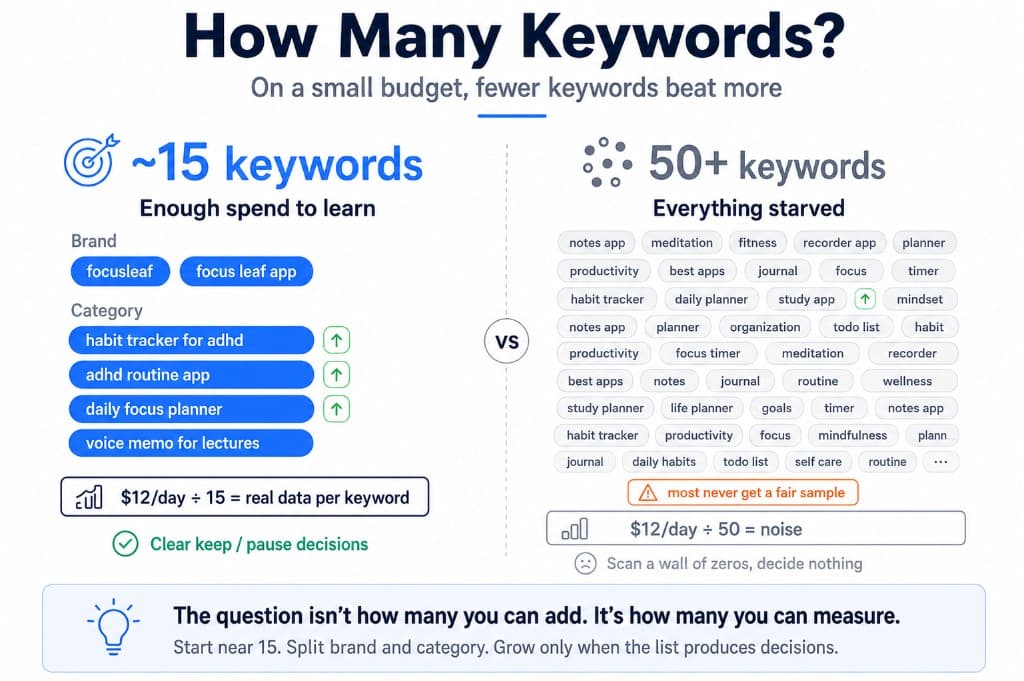
For a first learning phase in one storefront, a clean default looks like this:
- Brand: 2–5 Exact keywords for your app name and close variants
- Category long-tail: 10–15 Exact keywords that describe a specific use case
- Total: roughly 12–20 active keywords while you learn
That range is not magic. It matches the budget reality of many solo apps: a few hundred dollars over four to six weeks. At that spend level, twenty focused terms beat eighty half-tested ones. The same allocation logic shows up in where your first $500 should go.
If your daily budget is under about $15, err toward the low end. Every extra keyword competes for the same scarce taps.
Why fifty keywords fail beginners
Big lists feel thorough. They usually create three problems:
- No keyword gets enough spend. You cannot tell if a term is bad or just starved.
- Weekly reviews become busywork. You scan a wall of zeros and low-tap rows instead of deciding on a short list.
- Structure collapses. Brand, head terms, long-tail, competitors, and Broad discoveries end up in one blob. Reporting stops meaning anything.
I have opened accounts where almost every keyword had a few taps and nothing conclusive. The owner thought they needed more keywords. They needed fewer, with clearer jobs.
Structure matters more than the raw count
Do not dump every term into one ad group. Split by job:
- Brand Exact ad group. App name and close variants. Defensive, cheap, high intent.
- Category Exact ad group. Ten to fifteen long-tail terms. This is your learning engine.
- Discovery later, separate. Broad match or a small Search Match test only after Exact has taught you something. Keep it in its own ad group so expansion does not pollute brand and Exact reporting.
One match type per ad group while you learn. Mixing Exact and Broad in the same place makes the count meaningless because you no longer know what each keyword is really buying. See Exact vs Broad match.
Keep Search Match off on the learning campaigns. If Apple is adding queries behind the scenes, your “15 keywords” are not really 15. Details in Search Match is eating your budget.
What counts as a keyword worth adding
Before you grow past twenty, every new term should clear a simple bar:
- It maps to a real user problem your app solves
- You would want to rank for it organically
- It is specific enough that a tap implies intent, not casual browsing
- You can afford to give it a fair sample without starving winners
Skip head terms early. “Notes app,” “meditation,” and “fitness” look important and usually burn learning budget before you have revenue data. Prefer “voice memo for lectures” over “recorder app.”
Also skip giant competitor lists on day one unless conquest is an intentional test with its own budget. Competitor terms are keywords too. They still count against your ability to measure the rest.
When to add more keywords
Grow the list only after the current list is producing decisions.
- Add when several Exact terms clearly produce trials or revenue and you have budget left to test adjacent intents
- Add from discovery when Broad or search terms surface a converting query. Promote it to Exact. Do not leave winners buried in expansion forever.
- Do not add because the account feels quiet. Low volume on a tight list is often better than fake activity on a huge one.
- Pause before you pile on. If half the list has spend and no trials after a fair window, cut first. Adding more keywords will not fix dead intent.
A practical growth path: start around 15 Exact terms, harvest search terms weekly, negative the junk, promote Broad winners, and only then expand toward 25–40 active Exact keywords. Past that, you need either more budget or ruthless pausing. Negative keywords keep the growing list from filling with waste.
How budget changes the answer
Keyword count scales with spend and patience, not ambition.
- About $10–15/day: stay near 12–20 Exact keywords. One storefront. No Broad yet unless you carve a tiny discovery budget on purpose.
- About $20–40/day: you can support more Exact terms or a small separate discovery ad group, still with weekly harvest.
- Higher budgets: more keywords become workable only if reporting stays keyword-level and you pause losers on a schedule. A big budget with no review cadence just funds a bigger mess.
If you are running multiple countries, do not multiply a bloated list across storefronts. Prove a short list in one market first. Country-level ROAS differences can make the same keyword look smart in one place and terrible in another.
A weekly keyword-count routine
- Count active keywords by ad group. Brand, category Exact, discovery. If category Exact crossed thirty and half have no signal, cut before adding.
- Rank by spend and trials, not by hope. Keep terms with real engagement. Pause terms with spend and no path to revenue.
- Promote discovery winners to Exact. Each promotion should replace or outrank a weaker Exact term if budget is tight.
- Cap net new keywords. Adding five and pausing zero every week is how lists explode.
- Judge on revenue, not installs. Cheap CPI on a giant list can still be a dead account. See your ASA CPI looks great, your paywall conversion is terrible if installs look fine and subscribers do not.
The native ASA dashboard will show you a long keyword table. It will not tell you which of those rows fund subscriptions. AppSkale puts spend next to RevenueCat revenue so you can keep the list short on purpose.
Where to go next
For most beginners, the right number of Apple Search Ads keywords is closer to fifteen than fifty. Split brand and category Exact, keep discovery separate, grow only after the current list produces clear keep/pause decisions, and never confuse a longer spreadsheet with a better strategy.
If you are still setting foundation controls, read Apple Search Ads for beginners, then brand vs category keywords. For match types and cleanup, use Exact vs Broad match and negative keywords. For attribution setup, follow the Apple Search Ads attribution setup guide.
When you want to see which of those keywords actually pay, AppSkale connects Apple Search Ads spend to RevenueCat revenue so list size follows evidence, not FOMO.