CPT vs CPI in Apple Search Ads: Which Number Should You Trust?
By Sam H
Open an Apple Search Ads report and two cost numbers fight for your attention: CPT and CPI. Cost per tap. Cost per install. One looks like the bid you set. The other looks like what you “really” paid. Beginners pick a favorite, chase it down, and still cannot tell whether the keyword made money.
CPT and CPI answer different questions. Neither one is ROAS. If you optimize the wrong number, you will scale cheap trash or kill expensive winners.
This post explains what each metric means, when to use it, and why revenue per keyword still has to win the argument.
CPT vs CPI in plain English
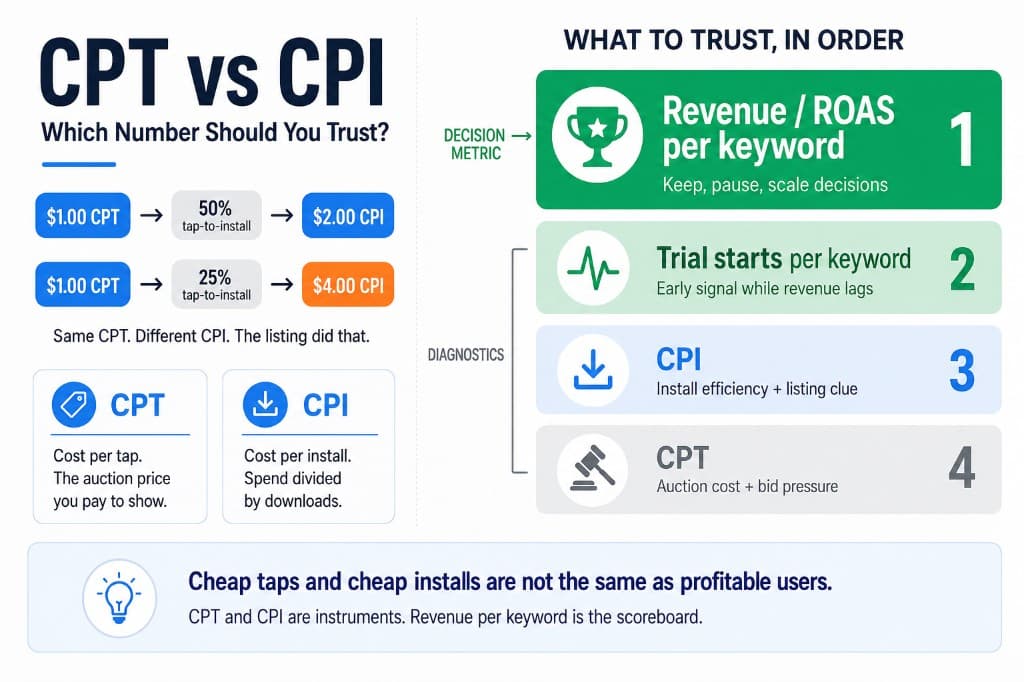
CPT (cost per tap) is what you pay when someone taps your ad. Apple Search Ads is a tap auction. Your max CPT bid is the ceiling you are willing to pay for that tap. Average CPT is what you actually paid across those taps.
CPI (cost per install) is spend divided by installs attributed to the campaign or keyword. Not every tap becomes an install. Listing quality, ratings, price, and relevance sit between the tap and the download. CPI folds that gap into one number.
Rough relationship:
If tap-to-install is 50%, a $1.00 CPT becomes about a $2.00 CPI. If tap-to-install is 25%, that same CPT becomes about a $4.00 CPI. CPT did not change. The listing conversion did.
What CPT is good for
CPT is the auction metric. Use it when you are thinking about bids, competition, and whether a keyword is getting more expensive to show for.
- Bid control. Your max CPT is the lever you set. If average CPT is pinned near your max, you may be losing auctions or barely clearing them.
- Keyword competitiveness. Head terms and rival brand names often have higher CPT than long-tail category phrases.
- Budget math. At $15/day and a $1.50 CPT, you are buying roughly ten taps a day before any install math. That matters for how much daily budget is enough to learn.
CPT does not tell you if the tap was worth buying. A low CPT on junk intent is still junk.
What CPI is good for
CPI is closer to acquisition cost for a download. Use it when comparing keywords on how efficiently they turn spend into installs.
- Listing and intent check. High CPT with low CPI can mean strong tap-to-install. Low CPT with high CPI can mean people tap and bounce off the product page.
- Relative keyword comparison. Inside the same app and storefront, CPI helps spot which terms buy downloads more efficiently.
- Sanity check after creative or screenshot changes. If CPT holds and CPI improves, the store listing may be converting better.
CPI still stops at the install. For subscription apps, that is mid-funnel at best. A $2 CPI that never reaches the paywall loses to an $8 CPI that starts trials. That trap is covered in your ASA CPI looks great, your paywall conversion is terrible.
Why chasing either number alone fails
Two common failure modes:
- Lowest CPT wins. You bid down, Broad or Search Match finds cheap loose queries, taps get cheaper, revenue does not move. See Search Match is eating your budget and Exact vs Broad match.
- Lowest CPI wins. You scale the cheapest installs. Those users never trial or pay. The dashboard looks efficient. The bank account disagrees.
CPT and CPI are diagnostic. They help you understand the auction and the listing. They are not the scoreboard for a subscription business.
The number that should decide scale
Revenue per keyword over a window long enough for your trial and first payment. That is the decision metric. ROAS is one way to express it: revenue divided by spend for that keyword cohort.
Practical hierarchy:
- Revenue / ROAS by keyword — keep, pause, scale
- Trial starts by keyword — early signal while revenue lags
- CPI — efficiency of buying installs, and a clue about listing conversion
- CPT — auction cost and bid pressure
If early ROAS looks dead while trials are starting, do not let CPT/CPI panic you into pausing too fast. See your trial started, your ROAS didn’t move. For the join between ASA spend and subscription revenue, read how to calculate Apple Search Ads ROAS with RevenueCat.
How to read CPT and CPI together
Use the pair, not a single favorite.
- High CPT, healthy trials/revenue: expensive traffic that may still be worth it. Do not cut just because CPT looks scary.
- Low CPT, weak CPI: cheap taps, weak install conversion. Check screenshots, ratings, and whether the query matches the listing.
- Low CPI, no trials: efficient downloads into a broken funnel or bad intent. Fix product path or pause the keyword.
- Brand CPT/CPI much better than category: normal. Brand is high intent. Do not judge category terms by brand benchmarks. See brand vs category keywords.
Also watch for expansion pollution. If Broad or Search Match is on, the CPT/CPI on a seed keyword can hide a mix of good and bad search terms. Read the search terms report before you trust the average.
A simple weekly habit
- Sort keywords by spend.
- Check trials and revenue first.
- Use CPI to see whether taps are becoming installs.
- Use CPT to see whether the auction is getting more expensive.
- Pause clear losers. Raise budget only on revenue winners, not on the cheapest CPI row.
Keep the keyword list short enough that those rows mean something. A wall of starved keywords makes every CPT/CPI sample noisy. See how many keywords you should run.
The native ASA dashboard is built around taps, installs, and CPT/CPI. It will not cleanly show subscription revenue next to those costs. AppSkale puts Apple Search Ads spend beside RevenueCat revenue so CPT and CPI stay diagnostics, not the final boss.
Where to go next
Trust CPT for auction and bid context. Trust CPI for install efficiency and listing clues. Trust revenue per keyword for keep, pause, and scale. If you only remember one line: cheap taps and cheap installs are not the same thing as profitable users.
If you are still setting up the channel, start with Apple Search Ads for beginners and the Apple Search Ads attribution setup guide. For budget sizing while you learn these metrics, use Apple Search Ads daily budget.
When you want keyword costs next to actual subscription outcomes, AppSkale connects Apple Search Ads to RevenueCat so you stop optimizing the wrong cost column.